
Private messenger
Your identity is not
your phone number.
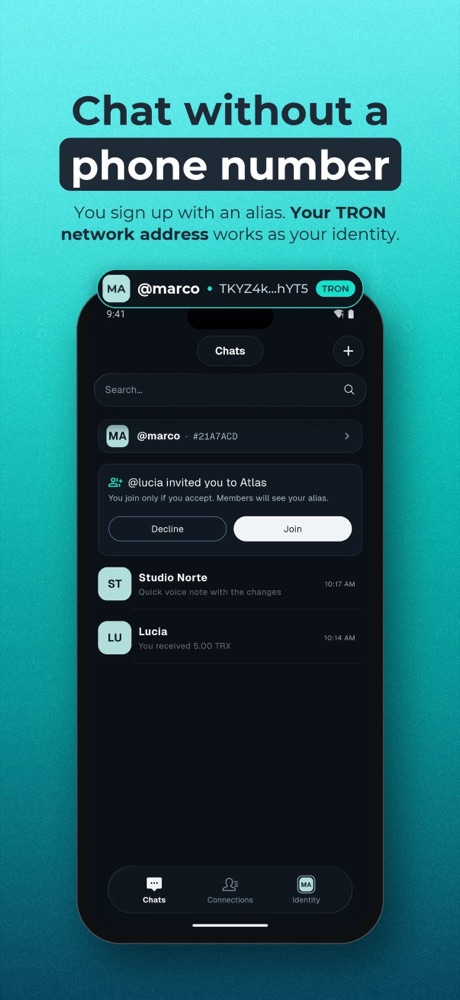
Hidenc doesn't ask for your phone number or email. You sign in with an alias and a PIN, and your conversations are encrypted on your phone before they leave it.
Your identity
What you get when you sign up
Your phone creates your identity. Nothing on this list is your name, your number or your email.
Alias
@marco
The name people see. You choose it.
HID code
#21A7ACD
Share it so people can find you and send a request.
On-chain ID
TKYZ4k…hYT5
Your address on the TRON network, created on your phone.
PIN and recovery phrase
•••••• · 12 words
The PIN opens the app. The phrase brings your identity back on a new phone.
Features
Built for conversations that stay yours
End-to-end encrypted chats
Messages, photos, documents and voice messages are always encrypted, with nothing to turn on. Only the people in the conversation can read them.
Voice messages
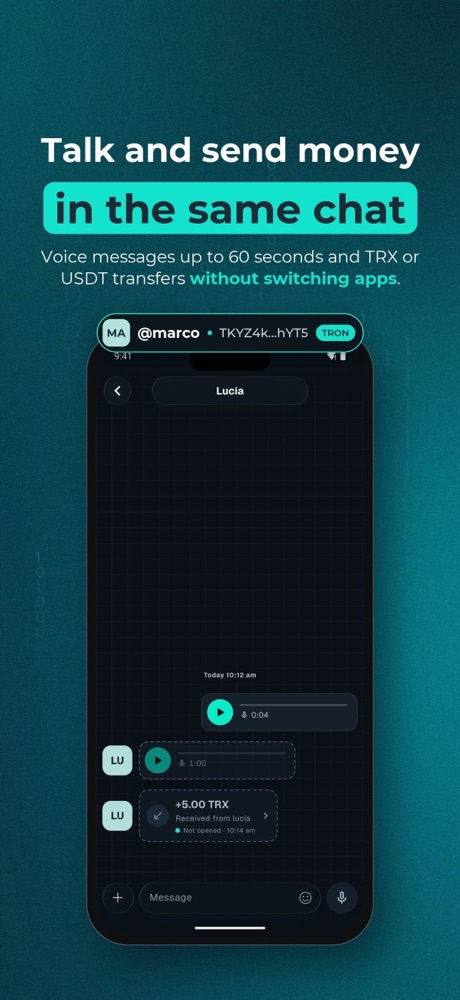
Press and hold the mic to record, release to send. Up to 60 seconds, in chats and groups.
Groups by invitation
Nobody can add you to a group without asking. You get an invitation and join only if you accept.
What you say stays here
Chats, groups and the files you open from them can't be captured or recorded on screen. Notifications don't show message content.
Verify your contacts
Check a contact with a safety code and see when someone starts using a new phone.
App lock
Lock Hidenc with your PIN or biometrics. Sound and vibration have their own settings, in light or dark mode.
Optional
Send money without leaving the chat
Hidenc is a messenger first. If you turn on on-chain features, you can send TRX and USDT on the TRON network to your connections from the conversation.
- Before signing you see the amount, the recipient and the network cost.
- You confirm with biometrics or your PIN.
- When a transfer comes in, Hidenc checks it on the network and tells you whether it matches.
- Your keys stay on your phone.
Transfers on TRON are public on the blockchain. Hidenc doesn't offer investment products or promise returns.
Security
What our servers can and cannot see
They cannot read
- Your messages, photos, documents and voice messages
- Your recovery phrase, your keys and your PIN
They can see
- Your alias, HID code and on-chain ID
- Which accounts take part in a conversation and when messages are delivered
What is Hidenc?
Hidenc is private messaging with an identity of your own, growing into productivity tools for people and teams.
You don't need a phone number or an email: when you sign up, your phone creates a unique alias, an HID code and an on-chain ID on the TRON network. Only the identities you accept can write to you.
Today Hidenc is an app for iPhone and Android. It is the first part of a service you will also be able to use from your computer and tablet.
Will I be able to use Hidenc on my computer or tablet?
We are building Hidenc for Mac, Windows and tablets, plus a web version you can use from your browser. The aim is for you to work from any of your devices with the same identity.
There is no date yet. We will announce it here, in FAQ and news, when it is available.
How does Hidenc protect my privacy and my data?
We ask for the minimum: no phone number, no email, no address book. Your recovery phrase and your keys are created on your device and we will never ask you for them.
Messages, photos and documents are end-to-end encrypted: only you and the people in the chat have the keys. Our servers deliver them but cannot read them.
Alerts on your phone only say that you have a new message or request, never the text or who wrote it.
Do I need to turn on end-to-end encryption?
No. It is always on in chats, groups, files and chat transfers. The keys are created on their own when you open your account.
If a contact still uses an old version of Hidenc, the app tells you and sends them nothing until they update.
What can I do with groups?
You can create private groups with identities you are already connected to and share photos, documents and digital assets inside them.
Channels and larger communities are planned but not available yet.

Get Hidenc
Free on the App Store and Google Play. Sign up with an alias in a couple of minutes.